Have you ever wondered how global companies manage to translate thousands of documents accurately, securely, and on time? In a fast-paced international market, businesses can’t afford costly errors, compliance risks, or delays when sharing information across languages. From legal contracts to technical manuals and marketing materials, every document needs to convey the right message while meeting strict data protection and industry standards.
This is where the best document translation software plays a vital role. Designed for global businesses, these tools combine speed, accuracy, and automation to help organizations handle high volumes of multilingual content with confidence.
With features like neural machine translation engines, OCR text extraction, PDF to DOCX conversion, and batch processing, the right solution transforms the way teams manage translations. But with so many options available, how do you know which platform is truly the best fit for your needs?
In this complete guide, we’ll explore what sets the best document translation software apart in 2025, covering must-have features, enterprise capabilities, security standards, and how pairing the right software with professional services can help you scale global communications without sacrificing quality. By the end, you’ll have a clear roadmap to choosing the perfect solution for your business.
What Makes Document Translation Software “The Best”?
Great translation software streamlines the process, cuts costs, maintains brand consistency, and delivers fast and more reliable results. Here are the powerful features to look for:
- Translation Memory (TM): Saves time and money by reusing previously translated segments.
- Terminology Management: Maintains consistent brand terms across languages in all markets.
- Alignment Tools: Helps you employ past and existing translated content for new projects.
- Collaborative Review: Allows teams and multiple stakeholders to review and validate translations before publishing.
Manual vs. Automated Translation Workflow
| Phase | Manual Process | Automated Process |
| Reuse of past content | Manual copy-paste from files | Reusing translations with a Translation Memory tool |
| Terminology consistency | High risk of errors when using inconsistent terms | Accuracy with Terminology Management tools |
| Review cycles | Lengthy email exchanges back and forth | Real-time collaborative review in-platform |
| File formatting | Manual reformatting | Automatic file handling and conversion |
Top Features to Look For in 2025
Projects often involve scanned images, PDFs, and multiple file formats. The best document translation tools tackle these challenges with:
- Neural Machine Translation Engine: Generates high-quality draft translations powered by AI at a fast speed.
- OCR Text Extraction: Converts scanned documents or images into editable text for easier processing.
- PDF to DOCX Conversion: Simplified editing, formatting, and translation workflows.
- Support for Multilingual File Formats: Handles .xliff, .idml, .srt, and many other industry-standard formats.
Our document translation services use advanced tools for OCR extraction and PDF-to-DOCX conversion, ensuring that complex and high-volume projects are delivered more quickly and accurately.
Enterprise-Ready Capabilities for Scaling Translation
Global businesses process thousands of documents, so they need scalability and seamless integration across teams and tools. The best document translation software enables:
- Batch Processing Files: Uploads and translates thousands of documents at once.
- Continuous Localization Pipeline: Automates updates for fast-changing content, like software UIs and eCommerce catalogs.
- Cloud API Integration: Connects with CMS platforms, code repositories, and cloud drives for smoother workflows.
- CAT Tool Interoperability: Exchanges files with Trados, memoQ, Smartcat, and other leading platforms.
Quality Assurance and Review: Getting It Right Before Delivery
Translation quality is non-negotiable. Advanced tools help ensure every document is error-free before going live:
- Automated Quality Assurance Checks: Detect errors, such as formatting issues, incorrect numbers, and inconsistent terminology.
- LQA Scoring: Measures linguists’ performance and translation quality.
- Live Preview Editor: Enables reviewers to view how translated text appears in the final format.
- Version Control: Tracks changes, approvals, and past versions for audit readiness.
Security, Privacy, and Compliance Features to Consider
Handling sensitive business data demands top-level security and compliance. The best document translation software offers:
- End-to-End Encryption: Protects data during transfer and storage.
- Role-Based Permissions: Restricts access to sensitive content based on user roles.
- GDPR Data Protection: Ensures legal compliance in European markets.
- ISO 17100 Compliance: Guarantees professional translation standards for regulated industries.
Real-World Use Cases: How Global Brands Leverage These Tools
DLA Piper
The leading global law firm, with offices in over 40 countries, collaborated with a translation services partner to translate large volumes of legal contracts and affidavits. They leveraged translation memory for consistency across versions and automated QA to reduce risk and turnaround time.
Amazon
Wunderman Thompson, a leading creative agency operating in 90 markets and serving 150 clients, leveraged Smartcat’s platform to localize Amazon product listings. Adaptive translation memory and automated workflows helped the agency increase translation output by 30%, maintain brand consistency, and reduce manual rework.
How to Choose the Best Document Translation Software for Your Business
Selecting the right document translation software in 2025 requires a structured approach. Follow these steps to find a solution that meets your needs:
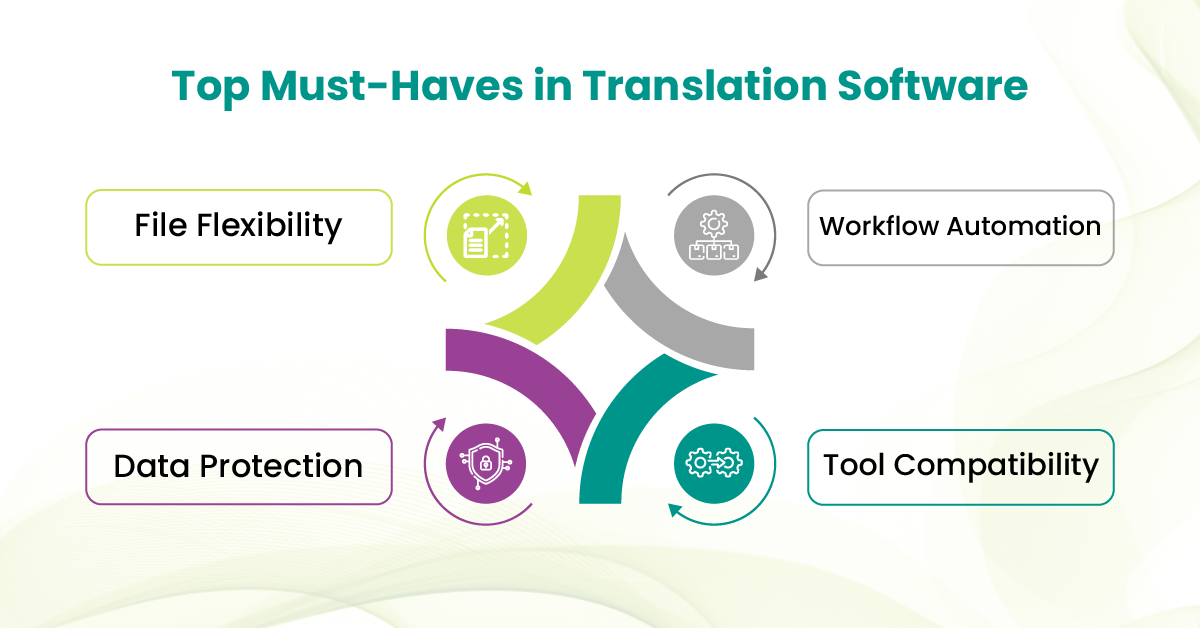
1) Assess File Format Compatibility
Look for software that can handle diverse multilingual file formats such as PDFs, scanned images, Word, Excel, XLIFF, or InDesign files. This flexibility saves time on manual conversions and keeps formatting intact.
2) Look for Automation Capabilities
Choose a platform that automates repetitive tasks like bulk uploads, translation memory application, and glossary management. Automation reduces turnaround time without compromising translation quality.
3) Prioritize Data Security
Handling sensitive documents demands enterprise-grade security features, including end-to-end encryption, role-based access control, and GDPR compliance. This protects your data and complies with industry regulations.
4) Check Integration Options
Verify that the software can integrate seamlessly with your existing tools and workflows, such as CMS platforms, CRM systems, and cloud storage solutions, to enable smooth collaboration and continuous localization.
Powering Global Communication with the Right Tools
Choosing the best document translation software in 2025 is essential for your global communication strategy. The right tool enables teams to handle large volumes of documents quickly, securely, and accurately, ensuring that messages remain clear across languages.
At TransPalm, we’ve seen firsthand how the right combination of technology and expertise transforms global workflows. Many clients come to us after struggling with inconsistent terminology, slow turnaround times, or compliance concerns.
With our professional translation services, we bridge the gap between powerful software and human precision, helping enterprises build trust with their international audiences while staying compliant and ahead of the competition.
If you’re ready to future-proof your multilingual documentation strategy, start with the right software and partner with experts who know how to make it work for you.